FLVPlayer4Free - MKV Player Software.

How to play MKV video with FLVPlayer4Free

MKV Player for windows step 1:
Download and install FLVPlayer4Free MKV Player from HERE .

MKV Player for windows step 2:
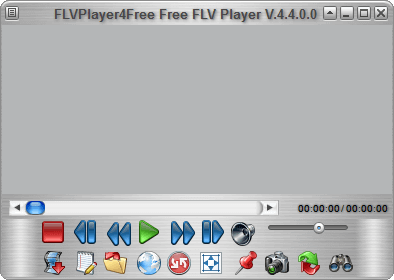
Run FLVPlayer4Free MKV Player.

MKV Player - FLVPlayer4Free Main Window

MKV Player for windows step 3:
Press "Open Media File" button.

MKV Player - FLVPlayer4Free Open Media File Button

MKV Player for windows step 4:
MKV video automically start.


How to play MKV video with FLVPlayer4Free with drag & drop

MKV Player software with drag & drop step 1:
Drag single MKV video or multiple MKV videos from your desktop or from explorer to FLVPlayer4Free.


How to play MKV videos automatically with FLVPlayer4Free

Automaticaly MKV Player step 1:
From Explorer or from Desktop selec MKV video.

Automaticaly MKV Player step 2:
Right click and select "Open with" then "Choose default program...".

Automaticaly MKV Player step 3:
Check "Always use the selected program to open this kind of file".

Automaticaly MKV Player step 4:
press "Browse..." button.

Automaticaly MKV Player step 5:
Select "C:\Program Files" then "FLVPlayer4Free" directory then "FLVPlayer4Free.exe".

Automaticaly MKV Player step 6:
Press "Open" then "OK".

Automaticaly MKV Player step 7:
Now, every time you launch MKV video, FLVPlayer4Free play it automatically.


Menu

Download FLVPlayer4Free - supporting FLV AVI DIVX XVID MP4 MPEG WMV ASF MPG M4V MKV DVR-MS HDMOV M2TS M2T MKA 3GP 3G2 3GPP 3GP2 MOV QT RM RAM RMVB

We do not condone copyright infringement and we urge you to respect the appropriate copyright laws of your Country or legal jurisdiction.
read more: 1 2 3

©2010 All Rights Reserved.
Sakysoft s.r.l.
P.IVA 02517520306

Video Player

Video Codec Help
Free YouTube Downloader