FLVPlayer4Free - WEBM Player Software.
Play WEBM videos - Download FLVPlayer4Free
Another Freeware application for playing WEBM video files is VLC media player

How to play WEBM video with FLVPlayer4Free
WEBM Player for windows step 1:Run FLVPlayer4Free WEBM Player.
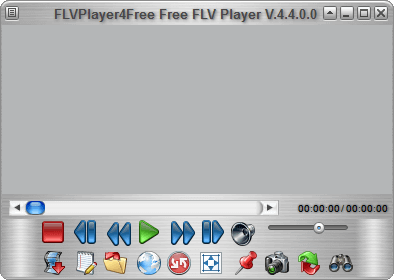
WEBM Player for windows step 2:
Press "Open Media File" button.

WEBM Player for windows step 3:
WEBM video automically start.
How to play WEBM video with FLVPlayer4Free with drag & drop
WEBM Player software with drag & drop step 1:Drag single WEBM video or multiple WEBM videos from your desktop or from explorer to FLVPlayer4Free.
How to play WEBM videos automatically with FLVPlayer4Free
Automaticaly WEBM Player step 1:From Explorer or from Desktop selec WEBM video.
Automaticaly WEBM Player step 2:
Right click and select "Open with" then "Choose default program...".
Automaticaly WEBM Player step 3:
Check "Always use the selected program to open this kind of file".
Automaticaly WEBM Player step 4:
press "Browse..." button.
Automaticaly WEBM Player step 5:
Select "C:\Program Files" then "FLVPlayer4Free" directory then "FLVPlayer4Free.exe".
Automaticaly WEBM Player step 6:
Press "Open" then "OK".
Automaticaly WEBM Player step 7:
Now, every time you launch WEBM video, FLVPlayer4Free play it automatically.
To install WEBM codecs on your system, please visit : webm codec download
To download WEBM video files from web sites on your hard disk, please visit : webm downloader